Shortcut keys for menus
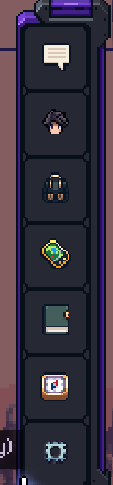
Current keys are
Enter: Chat
C: Profile
B: Bag
O: Social
K: Skills
L: Quest Log
Esc: Close
Issue being these are all over the keyboard, and mostly are not obvious.
Ideas:
Could add a letter bottom right to show the shortcut for quicker learning.
Right now the only keys that make obvious sense are B for Bag (i.e first letter = shortcut).
Therefore option 1:
Make the first key to the shortcut. This would work for P = Profile, B = Bag, Q = Quest log, however Skills and Social are off. However, you could rename Social to 'F' Freinds. As party can be moved to another area. Then you only have S for skills which is used for movement. You could re-name it if a relevant word can be used, or accept and put it on another key that makes sense. In general, this option makes sense as it is easy to remember the key as it's first letter, but issue is it's all over the keyboard.
Option 2:
Create shortcuts in order, with consecutive binds.
Z-Profile
X-Social
C-Skills
V-Quest Log
B-Bag
This keeps everything in order on the bottom row of the keyboard, and will help with everyone learning as you can just press them, worst case you press esc and try another. New menu items can just be added on N M in the future if needed. Only need to re-order Bag to bottom to make sense. Keybinds will take a little while to learn, as the keys are not linked to the name , but should be obvious pretty quickly.
Log in to comment and vote
Comments4
Michael Mccallum
Jul 29, 2024
Hello,
Thank you for the clarification, I will update the ticket with this new info.
Have a good day.
Michael Mccallum
Jul 26, 2024
Creating a ticket for this feedback.
Michael Mccallum
Jul 26, 2024
Hello,
Thank you for the feedback, I do not understand what it is you are requesting here. Are you saying that the buttons should be changed to something more obvious?
Have a good day.
abbbbbbb
Jul 27, 2024
Yes, look visually at the current binds where they are on the keyboard, they are all over the place, and are not initiative in any way, either clumped together, OR linked to buttons that are similar to the names.